Perfectionist Auto Sound and Security

Alaska's Most Award Winning Auto Customizer

  • About Us
    • Why Choose Us
    • Meet Our Team
    • Our Awards
    • Virtual Tour
    • Community Engagement
  • Signature Products
    • DroneMobile
    • SoundShield®
  • Services
    • Remote Car Starters
      • Vehicle Security
    • Car Audio
      • Sound Deadening
    • Custom Fabrication
    • Driver Safety
      • Bluetooth
      • Blind Spot Safety Systems
      • Camera Systems
      • Navigation Systems
    • Laser And Radar Detectors
    • Lighting
    • Offroad and Marine
      • Motorcycle Audio
    • Custom Interiors
    • Performance
      • Tires and Wheels
      • Suspensions / Lift & Lower
    • PRO Commercial Division
  • Gallery
    • Photos
    • Videos
    • Wallpaper Downloads
  • Contact Us
    • FAQ
    • Feedback
    • Join Our Team

Control Your Vehicle with Google Assistant or Apple Siri

08/21/2020 By John Schwartz

Google Siri Control

Drone from Firstech has made communicating with your vehicle more accessible than ever, thanks to integration with digital assistants like Google Assistant and Apple Siri. Remember when Michael Knight used to talk to KITT using a communicator on his watch? KITT could start the engine and be ready to go in a split-second once Michael arrived on the scene! If you’re feeling like recreating some classic ’80s television or simply want to unlock the doors of your vehicle without having to touch anything, Drone and the DroneMobile App have made this a reality.

DroneMobile and Apple Siri Control

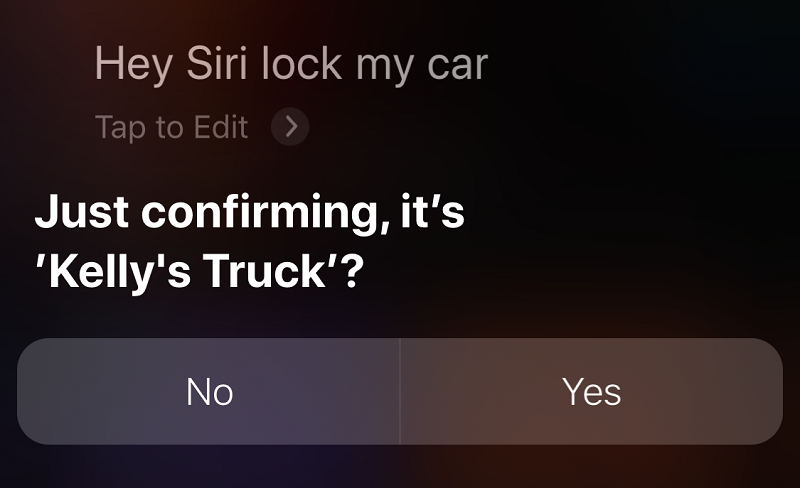
Version 4.3 of the DroneMobile app for iOS adds Siri digital assistant integration using Shortcuts. Shortcuts is a scripting app that acts as a go-between for DroneMobile and Siri so that your voice commands can control your vehicle. Once configured, you can say, “Hey Siri, lock my car.” Siri will confirm the vehicle you want to lock using the name you entered on the Drone web interface. You can say “Yes,” and the vehicle will lock a second or two later. You can tell Siri to start your vehicle just as quickly. Just say, “Start my car.”
Google Siri Control
When you request an action, Siri will confirm the name of the vehicle using the information you provided in the Drone web interface.

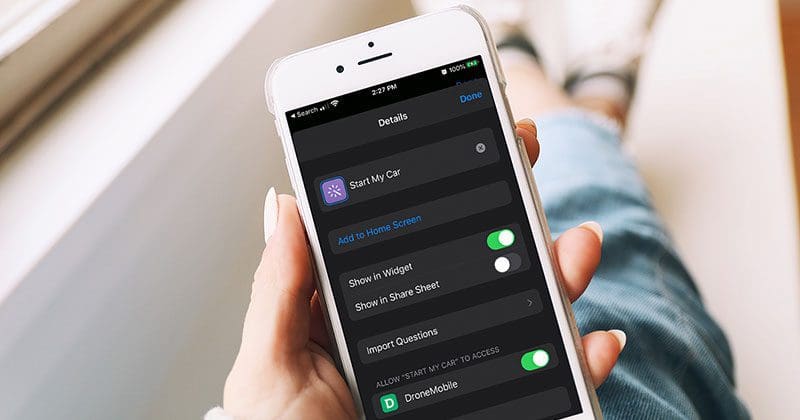
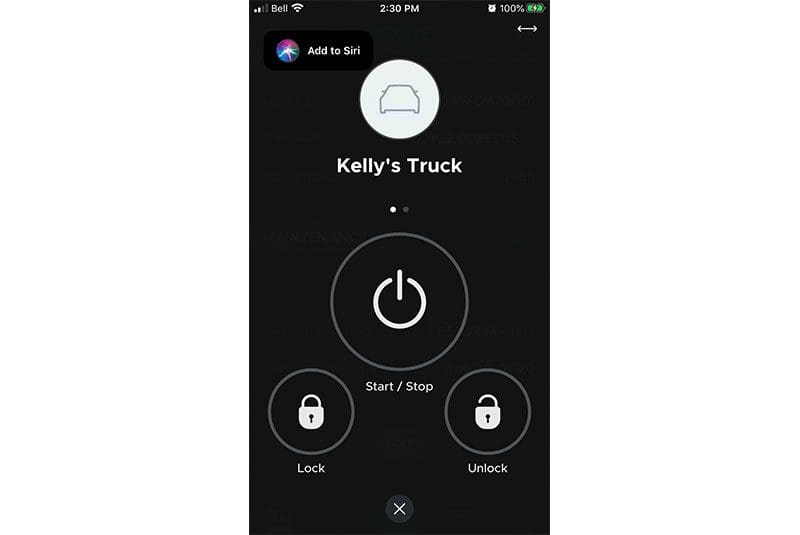
Adding the shortcut from DroneMobile to your smartphone is easy. All you have to do is tap on the Add to Siri icon at the top of the Controls Screen. The Shortcut app will pop up and let you customize the command text. You can configure it to recognize any text command you want. If you want the standard “Start my car,” then click Add to Siri. Alternatively, you can enter a custom command string like “Fire up my ride” or “Kitt, it’s time for action.” Other Drone commands that are compatible with Siri and the Shortcuts app are Stop, Lock, Unlock, Trunk, Aux 1 or Aux 2.
Google Siri Control
The Controls screen in the Apple DroneMobile app has a direct link to add a Shortcut to Siri.

DroneMobile and Google Assistant

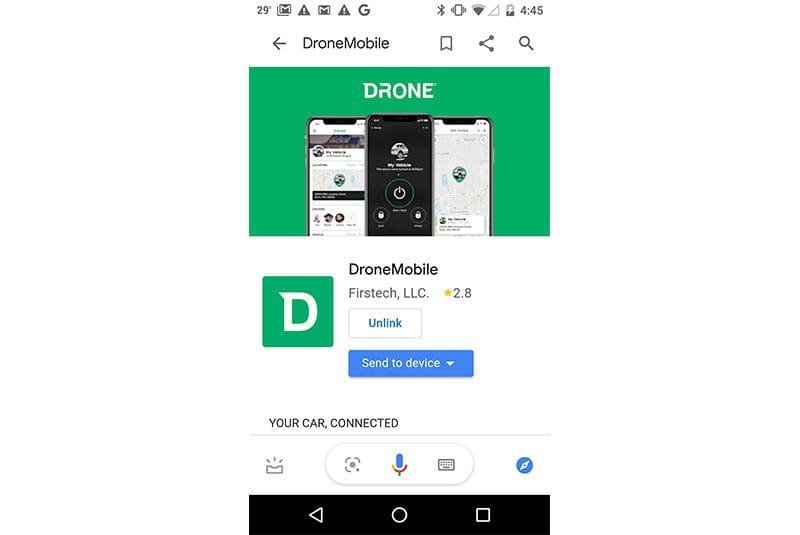
If you are an Android phone user or have a Google Nest smart speaker in your home or office, then you can integrate the Google Assistant app with DroneMobile to control your vehicle. You’ll need Version 4.4 of the DroneMobile app to make this happen. The Google Assistant and latest DroneMobile apps are, of course, available from the Google Play store.
Google Siri Control
Once you’ve linked DroneMobile with Google Assistant, it’s easy to send commands to your vehicle.

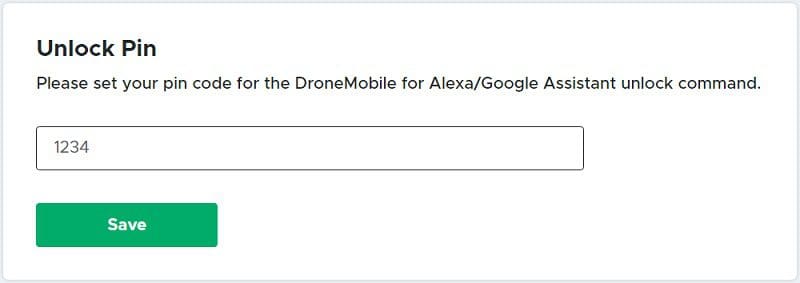
Drone has added an extra level of safety and security to its Android solution by including a PIN code. You can configure the PIN by logging into the Drone web interface, clicking on Edit Profile, then scrolling down to Unlock PIN.

Voice commands work a little differently on Android. If you want to remote start your vehicle, say, “Hey Google, use DroneMobile to start Kelly’s Truck.” In the background, Google Assistant launches the interface to DroneMobile, then transmits your request to start the vehicle. You’ll be asked to confirm the PIN for starting or unlocking commands. The system works best when you say the pin as a number, rather than a series of digits. So, one-thousand two-hundred and thirty-four trumps one two three four.
Google Siri Control
You can configure the remote start and unlock the PIN code using the Drone web interface.

Talking To Your Vehicle Is Easy

Giving your engine a few minutes to warm up while you gather your belongings in the morning can dramatically reduce wear on the engine and make the vehicle more comfortable if it’s hot or cold out. Being able to use voice commands with the latest versions of the DroneMobile app means you can multitask. When breakfast is finished, and you’re loading the dishwasher, just say, “Hey Siri, start my car.” All of the functions that work with your phone or smart speaker will also work with an Apple Watch or Android SmartWatch.

If you’d like to be able to use voice commands to control your vehicle, drop by your local authorized Firstech dealer and ask about the Drone telematics interface and a Compustar, Arctic Start, FTX or iDatastart vehicle security or remote starter system. You can find a dealer near you using the dealer finder. Be sure to visit the blog section on the Drone website, Facebook, Twitter, Instagram or YouTube to learn about any new features, products and technologies from Firstech and Drone.

This article is written and produced by the team at www.BestCarAudio.com. Reproduction or use of any kind is prohibited without the express written permission of 1sixty8 media.
This article is written and produced by the team at www.BestCarAudio.com. Reproduction or use of any kind is prohibited without the express written permission of 1sixty8 media.

Filed Under: ARTICLES, PRODUCTS, Remote Car Starters, RESOURCE LIBRARY Tagged With: DroneMobile

Using Technology to Protect Teenage Drivers

08/16/2020 By John Schwartz

Protect Teenage DriversDid you know that teenage drivers are three times more likely to be involved in a motor vehicle accident than those who are 20 or older? With their relative lack of experience and the constant bombardment of distractions, it’s no wonder that young people are at risk. The aftermarket mobile electronics industry offers a wide variety of systems and solutions that can protect teenage drivers.

Technology Reduces Distractions

Protect Teenage DriversWhile it’s certainly best practice to focus exclusively on the task of driving when behind the wheel, now and then, we need to take an important phone call. Bluetooth hands-free communication became a life-saver in the late 2000s, allowing a driver to talk with someone without having to hold the phone.
There are several ways to add Bluetooth to your vehicle if it didn’t come from the factory with hands-free communication features. A Bluetooth kit from companies like Parrot, Cruz, iSimple and Axxess can operate as a standalone solution or one that integrates with the speakers or radio already in your vehicle.

The second option is to upgrade your factory radio with an aftermarket unit that has Bluetooth hands-free calling and audio streaming capabilities built in. The majority of these solutions also add Siri Eyes Free and may even allow you to pair two phones at once.

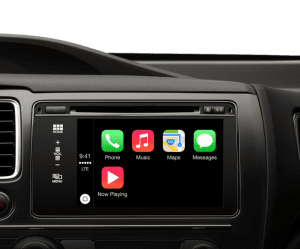
Protect Teenage DriversFor the ultimate in smartphone integration, an aftermarket multimedia receiver with Apple CarPlay or Android Auto adds a wide variety of communication, information and entertainment options that can be accessed using voice commands. By simply pressing and holding a button on your steering wheel, you can ask these systems to place a phone call, send a text message, or search for an address and provide navigation instructions. The voice recognition technology built into a smartphone allows the driver to keep their eyes on the road and mirrors to ensure he or she is safe.
CarPlay and Android Auto also help reduce distraction by making it much easier for your son or daughter to choose the music they want. They can pick a song, artist, album or even genre of music from the media stored on their smartphones. They also have access to streaming music services like Pandora, iHeartRadio, Slacker and Tidal – all by just talking to the radio in the vehicle.

Backup Camera and Parking Sensor Systems

We all know that backing into a parking spot is the ideal parking solution, since it makes pulling away much safer. Backing up can be tricky, especially when it’s hard to see objects or people behind the vehicle. An aftermarket backup camera system or parking sensor system is like having our own personal ground crew, guiding you to safety.

Parking sensor systems use an array of ultrasonic transceivers to detect objects behind your vehicle. From an abject as narrow as a signpost to a tricycle or trash can, objects of almost any size are detected very reliably. Most systems produce a warning beep when the objects are first detected at a distance of about 3–4 feet. The beeps increase in speed as you get closer and closer to the object. Finally, at about 12 inches, the beeps turn into a solid tone to let you know it’s time to stop. Parking sensor systems are also available with sensors for the front of the vehicle. These are a great option for parking in a garage or underground structure.

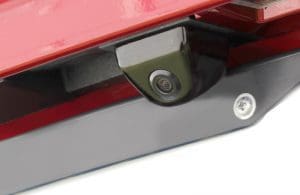
Protect Teenage DriversA backup camera system uses a compact camera to let you see an image of anything behind the vehicle. The image from the camera can be displayed on many factory-installed infotainment systems, a new rearview mirror with a built-in screen or an aftermarket multimedia receiver. The image appears automatically as soon as you put the transmission into reverse, so you don’t have to remember to press any buttons. Many video systems will support a secondary camera that faces forward on the vehicle. These second cameras are a great option for trucks, vans and SUVs whose large dimensions make them difficult to park.
Blind-spot Monitoring Systems

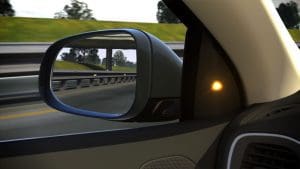
Protect Teenage DriversOne of the biggest challenges for a new driver is traveling on the freeway. Keeping track of the position of cars and trucks around one’s vehicle can be very difficult. An aftermarket blind-spot monitoring system lets you know when someone is driving beside you and can dramatically reduce the chance of changing lanes when someone is in your way.
The most-popular blind-spot warning system uses a pair of radar or ultrasonic transceivers that your installer mounts behind the rear bumper cover. These units monitor the area in the lanes beside yours for the presence of other vehicles or pedestrians. When someone or something is in your blind spot, a warning light will illuminate inside the vehicle to let you know what side the obstruction is on. In most installations, the warning lights are installed at the base of the A-pillar. In some systems, an audible warning will be produced when someone is in your blind spot and you turn on the correlating turn signal.

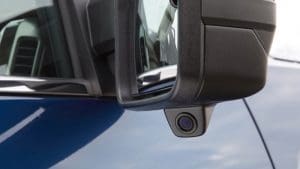
Protect Teenage DriversThe second option for blind-spot monitoring is a camera system. In these systems, cameras mounted underneath your rear vision mirrors display an image of the area beside your vehicle when you activate the turn signal. Just like the backup camera systems, there are many options available to display the image from the cameras.
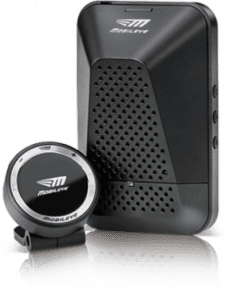
Collision Avoidance Systems

Protect Teenage DriversIf you are looking for the absolute state-of-the-art in protection, look into the Mobileye series of products. The Mobileye 660 uses a precisely calibrated camera to monitor the area in front of the vehicle and alert the driver when you are leaving your lane, approaching another vehicle too quickly, or at risk of colliding with a vehicle or pedestrian approaching from the side. This is the same technology that Tesla uses in its AutoPilot system.
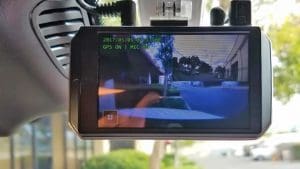
Video Recording Systems

Protect Teenage DriversAnother great option for a younger driver is to install a dash cam. A dash cam is a small video recording system that mounts to the windshield of the vehicle. The camera not only records everything in front of the vehicle, but most include an onboard GPS receiver and an accelerometer to store vehicle speed and driving behavior. If your son or daughter knows that you are recording everything they do, they are less likely to drive dangerously.
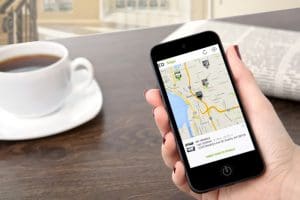
GPS Locating Systems

Protect Teenage DriversThe last option to consider is a GPS locating system. These devices combine a dedicated cellular data module with a compact GPS receiver to allow you to look at the vehicle location and speed any time you want. More-advanced systems include the ability to configure over-speed warnings, aggressive driving warnings and geofencing options that will alert you if the vehicle enters or exits a preset area. Just as with the dashcams, if the driver knows you are monitoring their location and speed, their behavior will change for the better.

Protect Teenage Drivers in Your Home

While no technology can replace experience and intuition, driving assistance devices are a great way to give teenage drivers a better chance of avoiding an accident. If you are interested in any of the products mentioned in this article, visit your local specialist mobile enhancement retailer and ask about compatibility with your vehicle.
This article is written and produced by the team at www.BestCarAudio.com. Reproduction or use of any kind is prohibited without the express written permission of 1sixty8 media.

Filed Under: ARTICLES, Driver Safety, RESOURCE LIBRARY

A Close Look at the Four Drone Subscription Packages

08/14/2020 By John Schwartz

Drone Subscription

Drone is a state-of-the-art vehicle control, monitoring and tracking solution from Firstech. Using lightning-fast LTE connectivity, the system will let you unlock the doors, pop the trunk, remote start and ensure that nobody is tampering with your vehicle — from almost anywhere on the planet. The Drone system requires a service package to let your smartphone connect to your vehicle. You have four packages to chose from, and each includes more features and information. Let’s take a close look at the functionality in each solution.

Drone Basic Subscription

Designed to provide remote control and security system (if equipped) feedback, the Basic package is an inexpensive way to make sure you are always connected to your vehicle. All packages include remote start, keyless entry, auxiliary output control and security system alerts. You can check the battery voltage and the temperature inside the vehicle at any time, from anywhere your smartphone has access to the internet.

Drone Subscription
You can check the temperature inside the vehicle using the DroneMobile app on your smartphone.

Drone Premium Subscription

Stepping up to the Premium package adds GPS location-based tracking features. You gain access to the GPS Car Finder feature so you can pinpoint the position of your vehicle in a matter of seconds. The Drone system can be configured to provide speed-based notifications to the user, so you will know if the kids or your employees are driving safely. Using the same technology, Curfew Monitoring will let you know if your vehicle moves after business hours or bedtime.

Drone Subscription
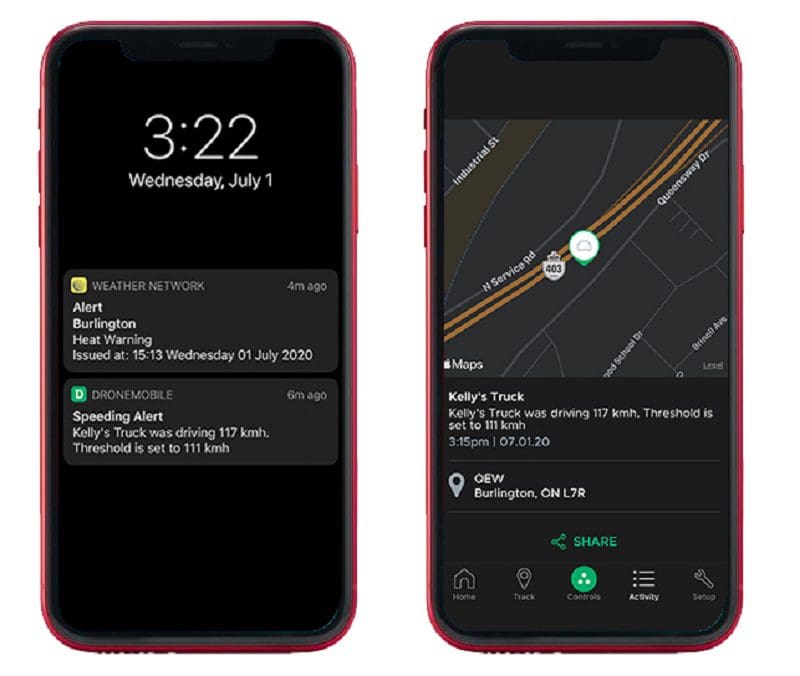
Users will get a notification if the vehicle exceeds a speed limit to ensure that everyone is driving safely.

Point of interest (POI) and geofence alerts are also included in the Premium subscription. You can define geographic areas that will trigger a notification on your smartphone when the Drone-equipped vehicle enters or leaves those zones. Setup for the location-based alerts is done through the web interface at accounts.dronemobile.com. The Premium package includes 10 point-of-interest locations and four geofences.

Drone Subscription
Geofences can be configured by street address or GPS coordinates. The boundaries can be fine-tuned to ensure that you receive notifications only when required.

The Premium package also offers maintenance reminders, so you’ll never forget when it’s time for an oil change. Likewise, diagnostic trouble code alerts will let you know if your vehicle has an issue that might require service.

Drone Subscription
Proper vehicle maintenance can save money in repair costs. Drone reminds you when it’s time for an oil change or regular service.

Premium Plus and Ultimate Packages

If you are a business owner, knowing where your assets are and how they are being used is crucial to managing your expenses. The Premium Plus and Ultimate packages are designed specifically for you. Both packages include a breadcrumb function. The Premium Plus package records a breadcrumb every two minutes, and the Ultimate records every 30 seconds. For clarification, breadcrumbs are location updates based on time. Every 30 seconds, or two minutes, the Drone system will note the location of the vehicle. Just like Hansel and Gretel, the system leaves a trail of location markings as the vehicle moves so you can review the route it has taken. Both packages also log turn-by-turn updates, and there are no limits to the number of geofence and point-of-interest notification locations you can add. Finally, the Ultimate plan includes location-based alerts, so you can be notified when your staff arrives at a client location.

Drone Subscription
Monitor where your vehicles travel and when with the Trip Report feature in the web interface.

History Log Information

All packages provide access to six months of activity in the History Log. You can sort information by vehicle or by the type of event for specific analysis. The information can be quickly and easily exported into a CSV file that will work with an external spreadsheet or database. The Trip Report option shows start and stop locations and times, based on the vehicle ignition being turned on and off. If any alerts are configured, they are added to the report.

Drone Subscription
Drone tracks where and how your vehicle is being used. This information is ideal for owners of company vehicles.

Communicate and Manage Your Vehicle with Drone

Whether you want the fastest unlimited-range remote control solution for a personal vehicle, or need detailed asset tracking for a fleet of company trucks or vans, Drone has a service package that delivers a perfect, easy-to-use solution. Visit your local authorized Drone retailer today for more information. You can find a shop using the Find a Dealer page on their website. For more information, follow Drone on its Facebook, Instagram and Twitter social media pages, and check out the latest feature and tutorial videos on their YouTube channel.

This article is written and produced by the team at www.BestCarAudio.com. Reproduction or use of any kind is prohibited without the express written permission of 1sixty8 media.

Filed Under: ARTICLES, PRODUCTS, Remote Car Starters, RESOURCE LIBRARY Tagged With: DroneMobile

Get Road Trip Ready With These Upgrades

08/09/2020 By John Schwartz

Road TripWith the cold winter behind us and school finished for the year, it’s time to start thinking about getting our cars, trucks and SUVs ready for our summer road trip or vacation. Whether you have toddlers or teens, keeping everyone in the vehicle entertained during the drive will make the entire adventure much more enjoyable. Let’s take a look at some of the options available to keep your passengers happy as you rack up the miles this summer.

Rear Seat Entertainment Solutions

Road TripThe classic road trip upgrade would be to have an overhead monitor or headrest monitors installed so your passengers can watch movies while you drive. The latest in a rear seat video solution is more of a computer than a TV screen connected to a DVD player. Many systems have video games built in and include wireless controllers. The games are not quite on the level of Fortnight or Minecraft, but they are still entertaining.

The majority of the headrest video systems available can be linked together so one unit can play a DVD on both screens. If you choose units that both include DVD players, make sure the headphones have at least two audio channels so passengers can listen to different soundtracks.

Another feature found on many new rear seat video systems is an HMDI input that is compatible with streaming solutions like Chromecast, Roku and Amazon’s Fire TV. If you have Internet connectivity, your options for entertainment are nearly unlimited. You can also connect a laptop or video game system to the screens. If you need a 120 VAC power inverter to keep that laptop charged or game system going, those are easy additions.

Headrest or Overhead Monitor Selection

Road TripThere is no specific benefit or drawback to choosing an overhead monitor versus headrest monitors. Of course, with the overhead, everyone will have to watch the same programming. If the ages or interests of your passengers vary, though, this might not be the best choice. A large overhead monitor also can block the view from the rearview mirror when it’s folded down. Finally, in most applications, installing an overhead monitor requires permanent modification to the roof liner of the vehicle. If you leased your car or truck, you probably want to return the vehicle with the video system in place.

If you choose to go with replacement headrest monitors, make sure the units you choose are compliant with vehicle safety standards. Your headrests are fundamental components in preventing neck injuries if you have an accident. Your local specialist mobile enhancement retailer can help ensure the products you choose will keep you safe. Another consideration is that a headrest monitor is much easier to remove from a vehicle at the end of a lease than an overhead one.

Mobile Internet Connectivity

Road TripThere are many ways to provide Internet access while on the road. We all seem to have cellphones with gigabytes of data access each month. Many smartphones will accept Wi-Fi connections from other devices, but if you happen to step away from the vehicle, the show stops. One solution is to have a mobile hotspot installed in your vehicle. Verizon, AT&T and Boost Mobile in the U.S. and Telus, Rogers and Bell in Canada offer portable solutions that work just like a wireless router in your home. Your kids can pair their tablets or computers to stream content to a video screen or play games with their friends over a high-speed 4G LTE connection.

Keep Your Smart Devices Charged

Road TripIf you are using your phone for navigation, your better half is posting on Facebook and the kids are building landscapes in Minecraft, you will need a way to keep all of those devices charged up while on the road. There are numerous options for adding USB charging ports anywhere in the vehicle. Having a few high-current USB ports for your rear seat passengers negates the need to keep battery packs charged up and can tidy up a lot of wiring clutter. Your installer can wire the USB power ports to the vehicle ignition switch so there is no chance of the devices draining your car battery when the vehicle engine isn’t running.

Travel Safely and Efficiently

Road TripIf you don’t have a navigation system built into your vehicle, you may want to consider one. Unlike the days of old, when maps from the auto club where the only way to help you get to your destination, modern navigation system provide detailed turn-by-turn directions. If you happen to veer off-course for a little sightseeing or make a wrong turn, the navigation system will update the route almost instantly to get you back on track.

In considering a navigation solution, there are two options. You can opt for a standalone solution like a Garmin, TomTom or Magellan product that sticks to your dash or windshield. While these solutions are reasonably priced, they add clutter to the vehicle’s interior and are dangerous in the event of an accident. The alternative is to upgrade your factory radio with a multimedia receiver with built-in navigation. Not only is the installation much tidier, but these advanced infotainment solutions also offer a lot more than just navigation.

Road TripIf you are shopping for a new multimedia receiver, you will want to look at a solution that includes Android Auto and Apple CarPlay. These smartphone integration technologies work with the Google or Apple voice recognition system built into your smartphone to allow you to perform commands by talking to the radio. You can make phone calls, listen to incoming text messages, and dictate a response or check your voicemail. Both systems also include navigation systems that monitor traffic flow in real time to ensure you have the most-efficient route. Google and Apple are constantly updating their map data, so you’ll never need to buy a map update again.

If you happen to enjoy listening to podcasts or audiobooks, a multitude of apps for either platform will keep you entertained and informed.

A side benefit of an aftermarket source unit is that you can play digital media files and have built-in hands-free Bluetooth calling. Many source units offer multi-zone functionality that allows you to send video from the DVD mechanism to the monitor for the rear seat passengers. There are hundreds of options for source units, so drop by your local car audio specialist retailer and try some out on their display boards.

SiriusXM Satellite Radio

Road TripAlthough it may seem intuitive to those who already enjoy SiriusXM, satellite radio is a great source of entertainment while you drive. Unlike terrestrial radio that has a range of about 30 to 40 miles, SiriusXM uses a group of five satellites to broadcast directly to receivers all over North America. You can listen to the same broadcast in British Columbia, California, Newfoundland or Florida.

SiriusXM serves up more than 50 genre-specific music channels so you can home in on the music you like. Country, Alternative, Classic Rock, Rap and many more channels are there for your selection. There are also news, sports, comedy and religion channels to keep you informed and entertained. If it suits your fancy, the infamous Howard Stern is alive and well, broadcasting on SiriusXM Channel 100.

Adding satellite radio to your car, truck or SUV is easy, and several transportable solutions or products will integrate with a factory-installed or aftermarket radio.

Cruise in Style with Aftermarket Accessories

Road TripMost mobile electronic retailers can help you out with automotive lighting upgrades to make driving at night safer. A quality LED or HID bulb upgrade in the factory lighting system can make a world of difference. If you are looking for fog or driving lights, or maybe a reading light for the kids in the back, they can help with those as well.

If your car didn’t come with cruise control, an aftermarket system can be added relatively easily. Companies like Rostra offer kits for drive-by-wire and cable-controlled accelerator pedal configurations. If you have a Chevy Aveo, Pontiac Wave, Scion xA or xB, Hyundai Accent, Kia Rio, Ford Focus, Honda Civic, or Dodge Ram, cruise control kits for these and many more applications will make crossing the countryside much more enjoyable.

Get Road Trip-ready

Before you pack your bags, drop by your local mobile enhancement specialist retailer and talk to them about the entertainment and convenience options they have available to make your next adventure a lot more fun.

This article is written and produced by the team at www.BestCarAudio.com. Reproduction or use of any kind is prohibited without the express written permission of 1sixty8 media.

Filed Under: ARTICLES, Car Audio, RESOURCE LIBRARY

The Advantages of Soundproofing Your Car, Truck or SUV

08/03/2020 By John Schwartz

Soundproofing carOne of the most significant upgrades you can make to your car, truck or SUV is to have it soundproofed by Perfectionist Auto Sound and Security in Anchorage. Installing sound-absorbing material not only makes your vehicle quieter, but it will also improve the performance of your car stereo, the clarity of your Bluetooth hands-free system, and can make the vehicle more comfortable. Many of our clients choose to upgrade their vehicles with soundproofing to create a more luxurious feel. Curious? Then you’re in the right place.

What Is Automotive Soundproofing?

When your car or truck rolls off the assembly line, there are often small panels or patches of butyl or vinyl attached to the floor and door skins. The added mass from these panels reduces the metal’s ability to vibrate. The result is diminished sound energy transfer from outside the vehicle into the interior.

We take sound deadening seriously. We worked with the fantastic team at Mobile Solutions in Arizona to develop our very own sound absorption solution. It’s called SoundShield.

SoundShield combines a 1.5 mm-thick layer of dense butyl rubber with a 3 mm-thick closed-cell foam topper that prevents buzzes and rattles. The materials are bonded to a flexible aluminum sheet that adds structural stability to malleable components so it can span openings in doors and trim panels.

Soundproofing Makes Your Car, Truck or SUV Quieter

If you want to reduce exhaust, wind, tire, road and mechanical noise in your vehicle, our team is here to help. You can decide how far you want to go. In most upgrades, we treat the inner and outer metal door skins, since they are the primary source of sound energy transfer into the vehicle. The floor, firewall, trunk, rear fenders and the roof are also prime candidates for noise control. You decide how quiet you want the vehicle to be, and we will deliver.

Improve the Performance of Your Car Stereo with Sound Deadening

Soundproofing carWhen a speaker is installed in the door of a car or truck, the inner metal skin acts as the mounting baffle. Since automakers are primarily concerned with assembling the vehicle rather than optimizing the audio system, this part of the door is typically full of holes that let the sound coming from the rear of the speaker cancel with the sound from the front. The result is that the audio system will play louder with less power. Bass and midbass from the door speakers will be improved dramatically (often as much as a 10 dB gain). Finally, because the speakers in the door (or rear deck or rear side-panel) don’t have to work as hard, the system will be more precise, and distortion is reduced.

Improve Bluetooth Hands-Free Clarity

When you’re talking to someone using Bluetooth, the system transmits the noise in the vehicle as well as your voice. If the interior of your car or truck is quieter, your voice will be clearer. In many cases, once a vehicle is soundproofed, many clients report that people can’t tell the caller is using a hands-free system. A bonus is that voice recognition and accuracy of Apple CarPlay and Android Audio are also improved.

Improved Comfort in the Summer and Winter

It’s no news that it gets good and cold here in Alaska in the winter. The thermal barrier added by SoundShield helps your climate control system warm your vehicle up faster when it’s cold out, and keeps heat out in the summer. SoundShield is popular with custom car and hot rod owners, as high-horsepower engines and large exhaust systems can turn a vehicle interior into an oven.

Upgrade Your Comfort at Perfectionist Auto Sound and Security

If you want to improve the performance of your car stereo, make your vehicle quieter inside or improve your comfort, drop by Perfectionist and talk to one of our Product Specialists about soundproofing your vehicle. You can also reach us by e-mail using our contact form to schedule a personal consultation.

Filed Under: ARTICLES, Bluetooth, Car Audio Tagged With: Android Auto, Apple CarPlay, Sound Deadening, Soundshield

  • « Previous Page
  • 1
  • …
  • 23
  • 24
  • 25
  • 26
  • 27
  • …
  • 82
  • Next Page »

801 EAST 82ND AVE
ANCHORAGE ALASKA 99518
907-563-8112

Copyright © 2026 | Site design by award-winning creative agency D'zine Alaska , with site support by 1sixty8 Media and Modern Media Geeks.