Perfectionist Auto Sound and Security

Alaska's Most Award Winning Auto Customizer

  • About Us
    • Why Choose Us
    • Meet Our Team
    • Our Awards
    • Virtual Tour
    • Community Engagement
  • Signature Products
    • DroneMobile
    • SoundShield®
  • Services
    • Remote Car Starters
      • Vehicle Security
    • Car Audio
      • Sound Deadening
    • Custom Fabrication
    • Driver Safety
      • Bluetooth
      • Blind Spot Safety Systems
      • Camera Systems
      • Navigation Systems
    • Laser And Radar Detectors
    • Lighting
    • Offroad and Marine
      • Motorcycle Audio
    • Custom Interiors
    • Performance
      • Tires and Wheels
      • Suspensions / Lift & Lower
    • PRO Commercial Division
  • Gallery
    • Photos
    • Videos
    • Wallpaper Downloads
  • Contact Us
    • FAQ
    • Feedback
    • Join Our Team

Compustar Prime Remote Start Upgrade on 2019 Honda HR-V

09/17/2020 By John Schwartz

2019 Honda HR-V
2019 Honda HR-V
2019 Honda HR-V
2019 Honda HR-V

A client from Anchorage, Alaska, brought her 2019 Honda HR-V into our shop, looking for a new remote start. As with all of our projects, we started this install with a check-in using an iPad, which includes taking photos of the interior and exterior, checking the functions of the vehicle, and performing a battery test. We then put a battery charger on the vehicle with a fender cover to protect its paint from any scratches.

During the install, our techs solder every connection and wrap the wires in electrical tape, followed by using JK Tapes — a cloth tape similar to the type used in a factory — to clean up the install.

We installed the Compustar Prime G15 remote on this customer’s van, along with the Compustar Drone. The Prime G15 is a two-way remote with a maximum range of half a mile. “Two-way” means that the customer will be alerted when the vehicle is started, locked or unlocked through an LED notification — even through a push notification when using the Compustar DroneMobile app.

When our client came to pick up the vehicle, she was smiling and so excited to be able to continue to stay warm all winter, and stay cool in our hot summers.

If you need a new autostart, contact us here at Perfectionist Auto Sound and Security, or just stop by and one of our sales associates or technicians will be happy to help you.

Filed Under: INSTALLATIONS, Remote Car Starters, Smartphone Integration Tagged With: 2019, Compustar, Drone, DroneMobile, Honda, HR-V

New Custom Seat Covers Bring 2014 GMC Sierra Interior to Life

09/15/2020 By John Schwartz

2014 GMC Sierra
2014 GMC Sierra
2014 GMC Sierra
2014 GMC Sierra
2014 GMC Sierra

A customer stopped by here at Perfectionist Auto Sound looking to upgrade the look of the interior of his 2014 GMC Sierra truck. He wanted his seats to complement the silver trim inside the vehicle. He was not a fan of the factory cloth seats and wanted a different material and sleeker design. In addition to a new look for the seats, he also wanted them to be heated.

We designed the seats using silver contrast stitching and a two-toned light-gray center. The seats looked great and matched the rest of the interior perfectly.

We then installed the button for the new heated seats on the dash, and it looked like it had come straight from the factory. The customer was happy and loved the new look of his truck.

For all your interior needs, Perfectionist Auto Sound and Security has you covered. Stop by the shop — we would love to customize your vehicle to fit your style!

Filed Under: INSTALLATIONS, Truck Accessories Tagged With: 2014, GMC, Heated Seats, Seat Covers, Sierra

Great Sound From A Factory Radio

09/13/2020 By John Schwartz

Factory RadioDid you know that you can get great sound in your car or truck using your factory radio as the source? Gone are the days when upgrading your audio system meant swapping in a new receiver. Today, climate controls, vehicle configuration and more are part of the original radio and display, so changes are nearly impossible. Don’t fret: The latest integration modules on the market make getting great sound easy. Keep reading to find out how.
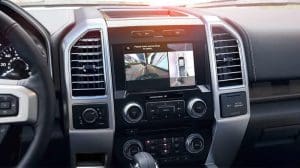
Keep Your Factory Radio

Factory RadioFewer and fewer cars today have radios that only play music. They show backup camera images or include navigation, and many offer voice recognition systems to make communication safe and easy while you drive. But what are audio enthusiasts to do when they want great sound in their vehicles? Companies like iDatalink, PAC, NAV-TV and more have developed interfaces that extract an audio signal from the factory stereo system and let us connect new amplifiers and speakers with no hassles at all.
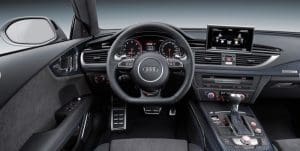
How Modern Factory Audio Systems Work

Factory RadioIn the good old days, factory audio systems included a radio, a simple analog amplifier and speakers. If you had a luxury vehicle, the manufacturer may have opted to include a subwoofer for a little more (but still not enough) bass. The radio was a simple affair with a tuner, CD player, auxiliary input and maybe a USB port and satellite radio connection. The output of the radio either powered the speakers in the car directly or fed a signal to a small amplifier.
Modern audio systems work differently. The source unit is similar, though USB is standard now and navigation systems and smartphone interfaces (like Apple CarPlay and Android Audio) are becoming standard, too. Where things differ a great deal is in the amplifier. The source unit sends an audio signal to the amp, sometimes as a fixed-level analog signal, but more often as a digital signal. The amplifier now includes multiple channels of amplification, plus advanced digital signal processing and the volume control circuitry for the system. In short, the radio can’t work without the amp and vice versa.

Getting Great Sound from a Ford F-150

Factory RadioLet’s look at three common upgrades that mobile electronics retailers across the nation perform every day. Since 2009, the Ford F-150 has come equipped with an amplifier in the back of the truck that includes the master volume control for the system as well as equalization and crossovers for the speakers. Upgrading this popular vehicle required summing audio signals coming out of the amp back together and removing signal processing.
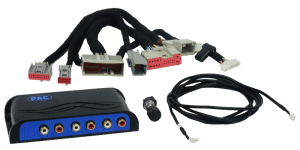
PAC, a division of AAMP Global, offers a product called the AmpPRO 4 AP4-FD11 that works with these vehicles. The AP4-FD11 interface contains two important components. First, an audio processor takes the fixed-level audio signal from the factory radio and feeds that to high-quality preamp outputs that will connect to a new amplifier. The second part of the module is a CAN network interface that monitors communication between the factory radio and amplifier. When the network interface detects audio-related messages like bass and treble adjustments or volume level changes, it routes appropriate commands to the audio processor and adjusts the output. In essence, the AP4-FD11 adds preamp outputs to an aftermarket radio.

The AP4-FD11 is compatible with late-model Ford F-150, Flex, Fusion and Taurus, and Lincoln MKS, MKT, MKX, MKZ and Navigator vehicles. A T-harness is included with the FD11 to make the installation easier for your installer.

Chrysler 300 Audio Upgrade Solutions

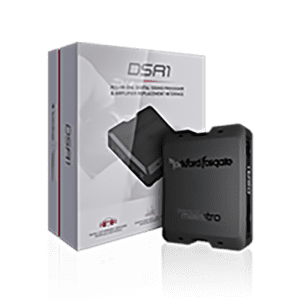
Factory RadioAnother popular audio system upgrade interface is the iDatalink Maestro DSR1. Automotive Data Solutions partnered with the audio experts at Rockford Fosgate to develop this interface and tuning solution. ADS are experts in the field of CAN communication protocols, thanks to their experience with remote car starter integration modules.
ADS combined this expertise with the Rockford 3-Sixty digital signal processor to create a unique audio interface solution that includes powerful system tuning features. The 3.Sixty DSP includes adjustable slope crossovers, 31-bands of paragraphic equalization for each of the eight output channels and signal delay for speaker time alignment. In the right hands and with the right speakers and amplifiers, the DSR1 can be the heart of an impressive audio upgrade solution.

Chevy Silverado Head Unit Interface

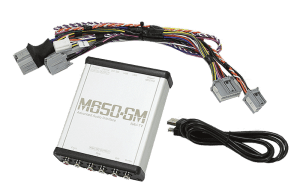
Factory RadioNAV-TV has created an impressive solution that is compatible with Chevy, GMC and Cadillac vehicles with the MyLink and Cue-equipped 4-inch (IO4) and 8-inch (IO5/IO6) source units. This interface connects to the MOST (Media Oriented System Transport) digital signal that runs from the factory radio to the amplifier in these vehicles to extract six channels of full-bandwidth audio that is free from equalization or signal delay.

The M650-GM interface retains OnStar functionality, door chimes, Bluetooth communication and all audio functions like volume, bass, treble, balance and fader. T-harnesses are available for a variety of vehicles to make the installation neat and tidy.

Upgraded Amplifiers and Speakers for Better Sound

Even when you see a branded audio system like Bose, JBL, Harman-Kardon or Sony, automakers still take shortcuts with the quality of speakers they use in factory audio systems and, of course, the systems never seem to have enough power. Once an interface is installed to extract a usable audio signal from your car or truck, your installer can integrate your choice of speakers to create smooth and detailed sound with dramatically improved clarity. Your salesperson will help you pick the right amplifier to create a system that will play at the volume levels you want without distorting or sounding muddy. If you don’t have a subwoofer, dozens of options are available to improve the low-frequency performance of your sound system to make everything more lifelike and enjoyable.

Visit your local mobile enhancement retailer today to find out how your factory radio can become a key component in an amazing audio system that rivals the best concert halls and studios in the world.
This article is written and produced by the team at www.BestCarAudio.com. Reproduction or use of any kind is prohibited without the express written permission of 1sixty8 media.

Filed Under: ARTICLES, Car Audio, RESOURCE LIBRARY

2015 Ford F-150 Gets Major DD Audio Bass Upgrade

09/08/2020 By John Schwartz

A client recently came by the shop, looking to add some more bass to his 2015 F-150 by adding subwoofers as an under-seat solution for his truck. After talking to the client and finding out exactly what sound he was going for, we wrote him up a quote for three subwoofers. We decided to go with an MTI Acoustics box, a brand of subboxes we’ve recently become exclusive dealers for. We chose a Stage 1 ported enclosure that housed 3 DD Audio 2508 8″ subwoofers. They were powered by an DD Audio M4 amplifier.

To ensure that the subs would be happy with the amount of air space, we had to lift the seats to allow more room for a bigger box. We did a 2″ rear seat lift, and the box fit perfectly. The customer was so happy with how loud the subs hit and loved the sleek look of the box.

Here at Perfectionist, we can accommodate and create any sound to fit your needs. Stop by the shop and one of our sales associates would be happy to build a system with you.

Filed Under: Car Audio, INSTALLATIONS, Truck Accessories Tagged With: 2015, Amplifiers, F-150, Ford, MTI Acoustics, Subwoofers

Drone Telematics is Ideal for Families with Young Drivers

09/08/2020 By John Schwartz

Young Drivers

If there’s a young driver in your family, upgrading your vehicle with a telematics system like Drone is a great way to know where they are and how they’re driving. Drone combines high-speed cellular LTE connectivity with an onboard GPS receiver to relay the exact location of the vehicle to your smartphone or the Drone website. You can even configure geofence notifications, so you know when the vehicle arrives at or leaves a specific location. Let’s look at how these features work to help keep parents calm when their kids are driving the family car or truck.

GPS-Based Vehicle Locating

The X1-MAX, X1R and DR-5400 Drone modules include an integrated GPS receiver antenna. Location information is visible within the DroneMobile app on your iOS or Android smartphone or on the Drone website. The GPS locating capability is impressively precise. This accuracy lets you know which side of a driveway you’re parked on or exactly where the car is in a mall parking lot.

If your son or daughter is out with the car, you can check their location and speed while they’re on the move. If you expect them home at 10:30, you can see whether they’ve left their friend’s house or movie theatre, or if they’re just around the corner.

Young Drivers
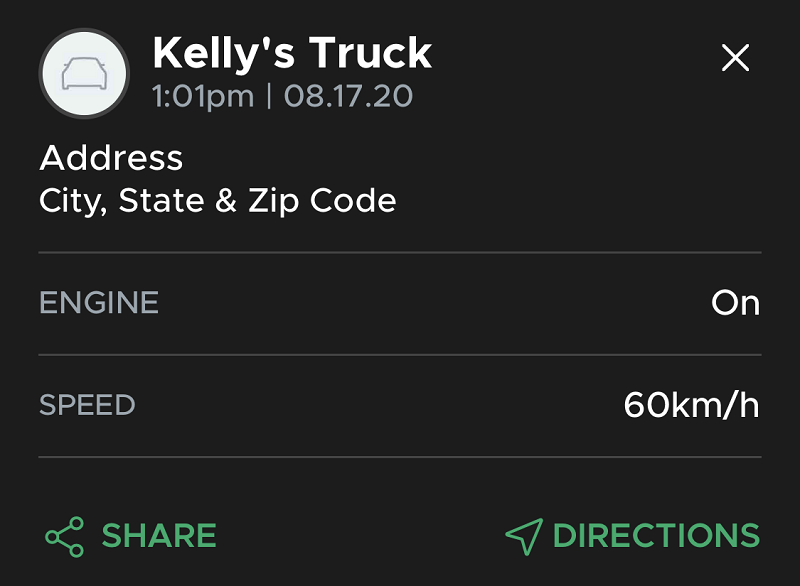
When you use the Drone app to find the location of a vehicle, you can click on the icon to see how fast the car is traveling.

Geofences Deliver Instant Alerts

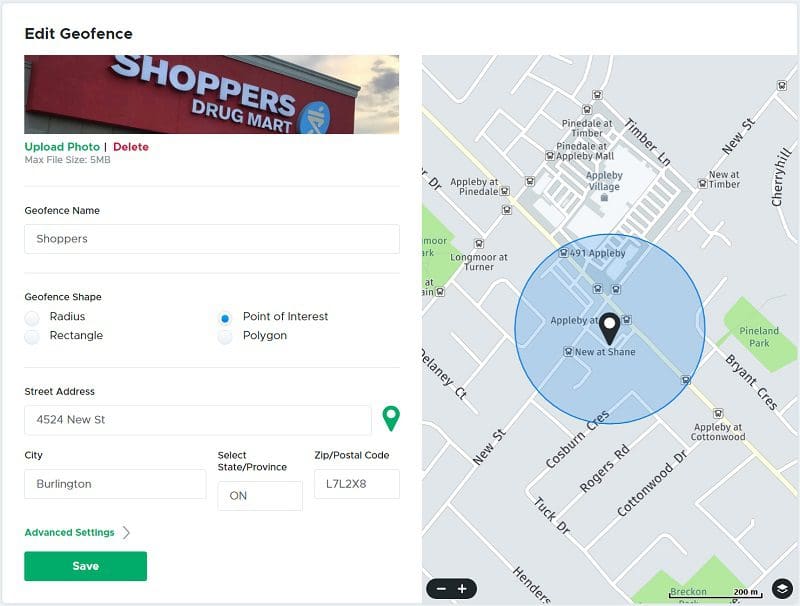
A lot of families allow their kids to use the family vehicle to go to work at a part-time job. By logging into the Drone website, you can create alerts based on an address or a geographic area on a map. The website allows you to set these warnings (called geofences) based on a radius around the chosen location or using a rectangle or adjustable polygon. Another option is to use the POI (Point of Interest) feature to set an alert. You can enter the address of a business or someone’s house, and the Drone system will let you know when the vehicle arrives at or leaves that location.

Young Drivers
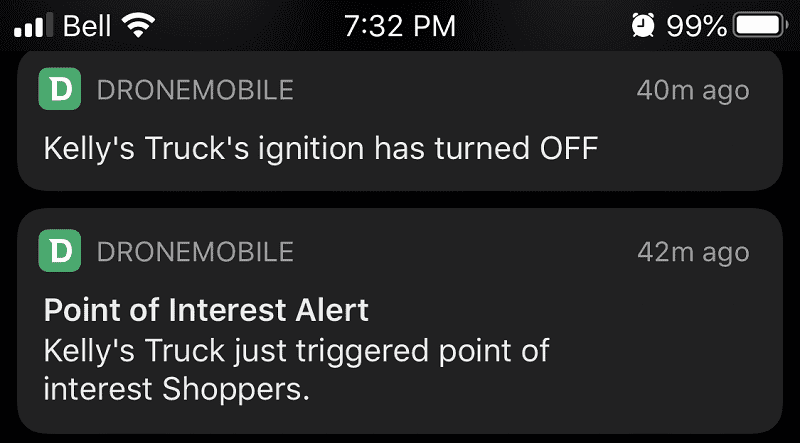
Using the POI feature on the Drone web interface, any time the vehicle enters this geofenced area, family members with DroneMobile on their smartphone will get an alert.

As you can see from the above screenshot, this family has configured the system to let them know when their son arrives at the drugstore where he works. This information will also be recorded in the Activity Log so that it can be reviewed later.

Young Drivers
When the vehicle arrives at the geofence location, the DroneMobile app pushes an alert to the user’s smartphone.

Speed Warnings Promote Safety

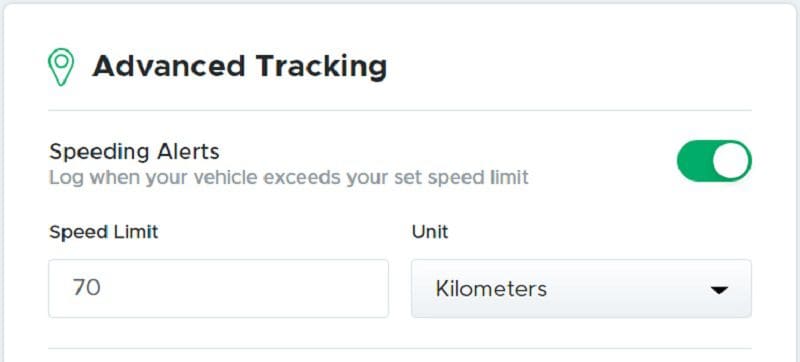
You can always click on the Location tab, then click on the vehicle icon to see how fast it is traveling. Likewise, you can configure the system to send an alert to your smartphone if the vehicle exceeds a preset speed limit.

Young Drivers
You can configure the Drone system to send you an alert anytime the vehicle exceeds a preset speed. These alerts can provide insight into how your child is driving.
Young Drivers
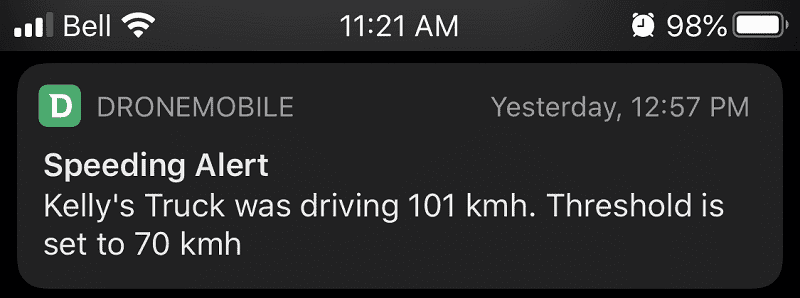
A notification that the vehicle has exceeded the speed limit you configured on the Drone website.

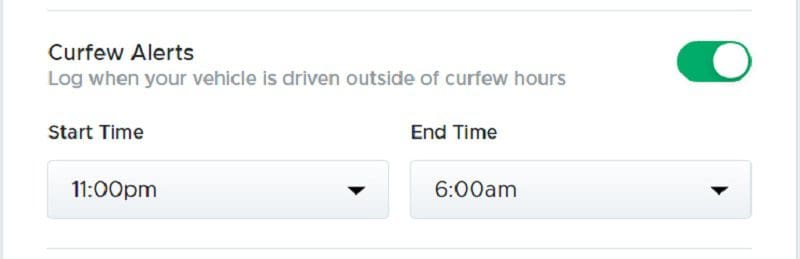
The Curfew Alert feature is another way to monitor the use of your vehicle. Once you’ve configured a start and stop time, the system will send a notification if the vehicle moves during that time period. There’s no way to sneak out at night with the car when this is activated.

Young Drivers
You can configure the start and end times for Curfew Alerts in the Drone web interface.

Drone Reduces Parent Stress

Most of us trust our children to take care of our vehicles. That doesn’t mean that we don’t worry when they’re driving. With Drone on board, we can check their location and speed as often as we want. Visit your local authorized Drone retailer to have the hardware installed in your vehicle, then choose from the Premium, Premium Plus or Ultimate service plan packages. You can learn more about the fantastic features of Drone by visiting their website, Facebook page, Instagram page and Twitter, or their YouTube channel.

This article is written and produced by the team at www.BestCarAudio.com. Reproduction or use of any kind is prohibited without the express written permission of 1sixty8 media.

Filed Under: ARTICLES, PRODUCTS, Remote Car Starters, RESOURCE LIBRARY Tagged With: DroneMobile

  • « Previous Page
  • 1
  • …
  • 21
  • 22
  • 23
  • 24
  • 25
  • …
  • 82
  • Next Page »

801 EAST 82ND AVE
ANCHORAGE ALASKA 99518
907-563-8112

Copyright © 2026 | Site design by award-winning creative agency D'zine Alaska , with site support by 1sixty8 Media and Modern Media Geeks.