Perfectionist Auto Sound and Security

Alaska's Most Award Winning Auto Customizer

  • About Us
    • Why Choose Us
    • Meet Our Team
    • Our Awards
    • Virtual Tour
    • Community Engagement
  • Signature Products
    • DroneMobile
    • SoundShield®
  • Services
    • Remote Car Starters
      • Vehicle Security
    • Car Audio
      • Sound Deadening
    • Custom Fabrication
    • Driver Safety
      • Bluetooth
      • Blind Spot Safety Systems
      • Camera Systems
      • Navigation Systems
    • Laser And Radar Detectors
    • Lighting
    • Offroad and Marine
      • Motorcycle Audio
    • Custom Interiors
    • Performance
      • Tires and Wheels
      • Suspensions / Lift & Lower
    • PRO Commercial Division
  • Gallery
    • Photos
    • Videos
    • Wallpaper Downloads
  • Contact Us
    • FAQ
    • Feedback
    • Join Our Team

Anchorage Client Adds Ford F-150 Radar and Laser System

04/28/2017 By John Schwartz

F-150 RadarA client from Anchorage, Alaska, had come to Perfectionist Auto Sound and Security to have a remote starter installed in his 2008 Roush Edition Ford F-150. When he came to pick up the truck, we started talking, and he mentioned he also had a Roush Mustang. He clearly likes quick vehicles. We had just returned from a K40 Electronics training session, so we mentioned some of the cool features of the RL360i system. After explaining how everything worked, the client was on board with the F-150 radar and laser plan, but he needed the work done quickly as he was selling his house and moving down south.

K40 System Installation

F-150 Radar
The front laser defusers are nestled in-between the bumper and grille.
F-150 Radar

James Hunt, one of our elite installation technicians, started the project by removing the front bumper. He needed as much access as possible to mount the pair of K40 Defuser LTS g5 transponders in the gap between the bumper and the front grill trim. He ensured that the transponders were perfectly level and aimed directly forward for maximum range and reliability. He also mounted the radar receiver from the RL360i kit behind the plastic bumper cover. Plastic has no effect on radar waves. But it does on LIDAR diffusing.

At the rear of the vehicle, we used a K40 Defuser g5 license plate frame system. This cast frame mounts to the factory license plate mounting points and includes a g5 laser transponder. James mounted the rear radar receiver under the bumper. The trailer hitch protects the radar receiver from damage.

James mounted the warning LEDs on either side of the center console. He hid the warning buzzer under the dash. As always, all wiring is protected with Tesa cloth tape, and all electrical connections were soldered where applicable.

K40 Ticket-Free Guarantee

F-150 Radar
In the event of a ticket, K40 will reimburse the client, how’s that for service?

Since 1985, K40 Electronics has offered a program called the Ticket-Free Guarantee. K40 will reimburse the owner the cost of the speeding ticket if they own a K40 system. If the client were to get a ticket, all he has to do is send K40 a copy of the ticket, proof of payment and the receipt for the purchase of the system. K40 also offers amazing consumer support and qualification with their K40 Consult service.

Pioneer AppRadio Upgrade

F-150 Radar
The Pioneer AppRadio gives the client control of his smartphone from the dash.

The client wanted a radio that he could use with his iPhone. We installed a Pioneer SPH-DA120 AppRadio 4 in the truck using a dash kit, mounting harness and antenna adapter from Best Kits. We ran the USB cable into the glove box so the client could connect his iPhone to use Apple CarPlay.

F-150 Radar System A Hit With the Client

The client was thrilled with our work and ability to meet his tight deadline. We managed to complete three days of work in less than two. The client was thrilled we met and exceeded his goals!

Filed Under: Car Audio, FEATURED INSTALLATIONS, Radar Detectors, Smartphone Integration Tagged With: 2008, F-150, Ford, K40, Pioneer, Radios, Roush

Product Spotlight: Wet Sounds WS-220 BT

04/26/2017 By John Schwartz

WS-220 BTPerfectionist Auto Sound & Security in Anchorage has been building the finest marine audio systems for our clients for over a decade. One of the most versatile products we offer is the Wetsounds WS-220BT.

Wet Sounds Legacy

One of the things we appreciate most about products from Wet Sounds is the company’s dedication to marine. Ever since their founding, everything they do has been designed to give you a better-sounding, longer-lasting, more fun day on the water. Their products are not car audio products that are relabeled marine, but rather, products engineered from the ground up specifically for the needs of a boat owner.

Four-zone Control

WS-220 BTRight out of the gate, having up to four different zones controlled at your fingertips makes it a lot easier to enjoy the music you want on all the areas of your boat. Imagine being able to control the volume down inside the cabin, up on the main deck, in your tower speakers and in your subwoofers, all from one convenient spot, with all of them at different levels.

Listen to Three Different Sources, Including Bluetooth

WS-220 BTLet’s say you hop on your boat and start cruising toward your destination. You can listen to the source unit in your boat, use Bluetooth wireless music streaming to enjoy music from your smartphone or use the aux input to play almost any portable media.

Talkback Microphone for Added Convenience

Imagine this scenario: You are on the water, enjoying your day, and you want to talk to the people splashing around in the water or resting on the shore. You simply get out the talkback mic and begin speaking. The Wet Sounds WS-220BT will mute zone 1 and use those speakers to let you communicate with them easily and efficiently.

Schedule a Consultation and Learn More About the WS-220 BT

The next step in getting a great-sounding marine audio system that you will enjoy for years to come is by scheduling a consultation with Perfectionist Auto Sound & Security. You can stop by our state-of-the-art showroom, call us or simply click HERE. One of our team will work with you to design and build the stereo system that best fits your unique needs.

Filed Under: Bluetooth, Marine Audio, PRODUCTS Tagged With: Wet Sounds

What is Bluetooth?

04/23/2017 By John Schwartz

BluetoothIf you have been around the mobile electronics industry for any amount of time, you will know that certain terms are often used incorrectly. One term that has been over-abused lately is Bluetooth. Product manufacturers, retailers and consumers have developed an expectation of what Bluetooth is, and what it does. Sadly, those expectations can lead to confusion and undesirable results. This article explains what Bluetooth is, and how it is used.

What is Bluetooth?

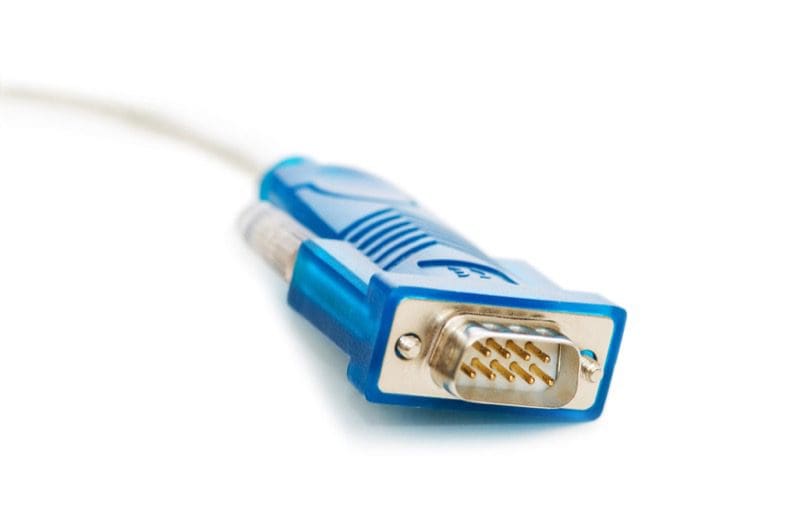
BluetoothBack in the dark ages, we had to connect electronic devices with wires. We also created wheels from boulders using animal bones as tools. RS-232 was a popular type of communication protocol for devices like modems, printers, scanners and cameras. Two wires would carry data between these devices and your computer. In 1994, Ericsson – a telecommunications and network equipment manufacturer in Stockholm, Sweden – introduced a wireless alternative to RS-232 called Bluetooth.

Bluetooth is a low-power, high-speed wireless communication protocol. Bluetooth operates using short-wave UHF radio waves in the frequency band of 2.4 to 2.485 GHz. Within this range of frequencies are 79 dedicated Bluetooth channels. Bluetooth uses Frequency Hopping Spread Spectrum to reduce errors and allow multiple devices to operate within the same frequency spectrum.

Bluetooth is used for short-range data communication between devices like computer and keyboards, video game controllers and consoles, and cellular phones and wireless devices. There are applications for medical applications such as monitoring heart rate, blood pressure and glucose levels. That said, many industrial applications exist between sensors in production systems and control computers.

Bluetooth Profiles

The misconception many people in the mobile electronics industry have is that Bluetooth exists to let cellular phones make calls and stream music to our radios. Bluetooth is far more involved and flexible than that.

Any talk of Bluetooth functionality is a perfect segue to introduce us to profiles. A Bluetooth profile is a set of instructions and commands that operate over a Bluetooth connection. Profiles simplify the communication between devices. In our industry, we are used to four common profiles:

PBAP – Phonebook Access Profile

HFP – Hands-free Profile

A2DP – Advanced Audio Distribution Profile

AVRCP – Audio Video Remote Control Profile

These profiles are used in varying combinations to allow you to connect your phone to your car radio so you can make phone calls and stream music. A few companies that have wanted to provide an Internet connection to their radio have used DUN to accomplish this task.

PBAP Profile

The Phone Book Access Profile allows your source unit to receive phonebook entry information, as well as manage it. Phonebook entries are transmitted and managed by the radio in vCard 2.1 or vCard .0 formats. Missed, received and dialed numbers are listed as well.

HFP Profile

The Hands-free Profile carries monaural audio between the phone and a secondary device. The profile also supports commands to answer or reject incoming calls; place a call; use memory data to place a call, terminate a call or manage phone volume level; and send phone status information, including battery, roaming status and signal strength . These functions are included in version 1.5 of the Hands-free Profile. Future versions, such as 1.7, will include support for wideband speech and the use of external audio compression and decompression codecs.

A2DP Profile

The Advanced Audio Distribution Profile operates within another profile called the Generic Audio/Video Distribution Profile (GAVDP). A2DP is responsible for allowing us to stream audio from a device such as a smartphone to a radio or powered speaker. The basic profile allows for stereo audio to be transmitted at a sampling frequency of 44.1 kHz at up to 328 kb/s. The use of a third-part codec such as aptX from Qualcomm or LDAC from Sony may further improve on bandwidth.

AVRCP Profile

Functioning alongside the GAVDP profile is the Audio Video Remote Control Profile. AVRCP is responsible for the display of song title, artist and album information, and control over playback device functions. If you can imagine a button on a DVD remote control, the AVRCP is likely to support it. Most car audio source units include functions like play, pause, fast-forward and rewind. The most recent versions of AVRCP include support for folder navigation and searching.

What Bluetooth Doesn’t Do

Although the Bluetooth Special Interest Group (SIG) works to manage the different Bluetooth communication and profile standards, there are variations in functionality between profile versions and, more importantly, between smartphone vendors. This latter fact can be a significant issue for buyers of car audio source units. The expectation that it “should work,” while not unreasonable, is not always possible. To expect a seven- or eight-year-old radio to work flawlessly with a brand-new iPhone 7 or Samsung Galaxy S8 isn’t reasonable. The hardware in the older units cannot be upgraded.

How to Buy Bluetooth

BluetoothIf you are shopping for a new source unit, take any smartphone you want to use with it to the retailer. Ask to pair your phone with the demo unit on display. Check that your entire list of phone contacts transfers as expected. Make sure you can use voice control functions if they apply to your phone. See that you can make calls easily. Finally, check that your phone reconnects reliably to the source unit by cycling power on the source a few times.

If you purchase a new radio and have it installed, only to find out it is not compatible with your smartphone, there is often nothing that can be done quickly. Some manufacturers do release updates for Bluetooth functionality, but these updates are not going to turn a Bluetooth 3.0 system into a 4.0, or add AVRCP 1.4 to a system that shipped with AVRCP 1.2. Do your research before you buy!

If you are looking for a hands-free solution to make phone calls or stream music to your audio system, drop in at your local mobile electronics specialist retailer. Bring your phone, pair the Bluetooth connection and experiment with the options.

This article is written and produced by the team at www.BestCarAudio.com. Reproduction or use of any kind is prohibited without the express written permission of 1sixty8 media.

Filed Under: ARTICLES, Bluetooth, Car Audio, RESOURCE LIBRARY

When it Comes to Subwoofer Specifications, Some Numbers Don’t Matter

04/16/2017 By John Schwartz

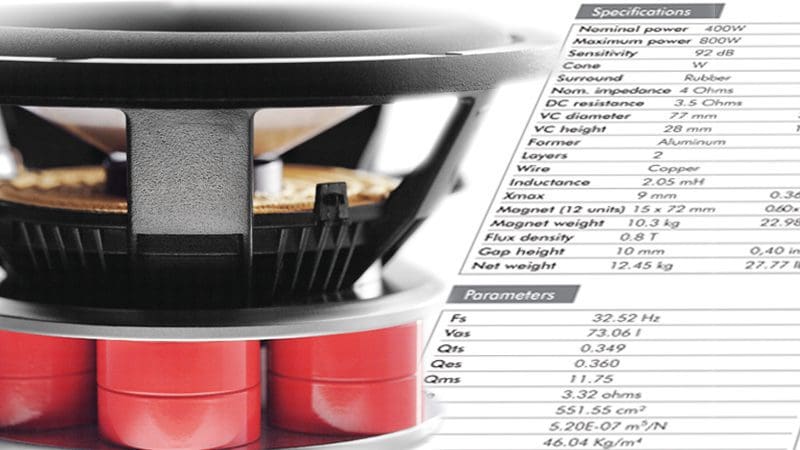
Subwoofer SpecificationsIf you are a mobile electronics enthusiast like we are, then it’s quite possible that you enjoy reading product specifications. You can learn a lot about the design and application of a product from the specs. Amplifier power ratings are probably the most popular specs, but there are a lot more. One product specification that tends to confuse people more than help them is speaker efficiency. This article explains what the numbers mean and how you should analyze the appropriateness of subwoofer specifications, one subwoofer to another.

Speaker Efficiency

Subwoofer SpecificationsIn a nutshell, the efficiency specification attempts to quantify how much sound a speaker will produce when provided with a given amount of power. Manufacturers provide the specification in two common methods. The most common are decibels of output when fed with 1 watt of power and measured at 1 meter from the speaker, written as 1 W/1 m. The other specification method involves replacing the 1 watt power measurement with 2.83 volts. For a 4 ohm car audio speaker, 2.83 volts works out to 2 watts of power or 4 watts into a 2 ohm speaker. Make sure to take the impedance of the speaker into consideration with the latter format.

For a subwoofer, we derive this efficiency number with a formula that includes the driver’s resonant frequency, equivalent suspension compliance and driver’s electrical Q. In reality, the resulting number is purely theoretical and applies most directly to output in the frequency range above where most subwoofers play. There is the heart of the matter: The efficiency specification doesn’t describe how loud the subwoofer is at low frequencies. The only way to predict and compare performance is to model the behavior of the driver in simulation software.

Frequency Response Simulation

Let’s compare two 10-inch speakers. For sample A, we will use a very high-quality car audio subwoofer. Since we want to make this example somewhat extreme, we will use a 10-inch pro audio woofer as Sample B in our comparison. We will use BassBox Pro 6 to make the comparisons.

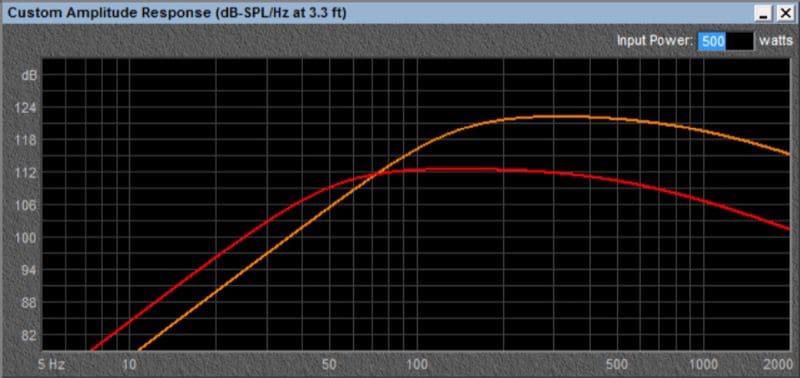
Sample A has a calculated efficiency of 93.21 dB when driven with 2.83 V. Sample B has an efficiency of 95.07 dB. Without modeling the low-frequency behavior of the driver, you’d happily think that Sample B was the louder of the two by 1.86 dB.

We modeled each driver in a sealed enclosure with a volume that provides a total system Q (Qtc) of 0.707. The car audio subwoofer is in 0.694 cubic feet, and Sample B is in 0.378 cubic feet net.

Subwoofer SpecificationsAs you can see from the graph, the output of the two woofers varies dramatically. Sample A is louder at 40 Hz by an impressive 4.95 dB. That is contradictory to the efficiency specification, isn’t it? It is, however, not wrong.

Subwoofer Specifications

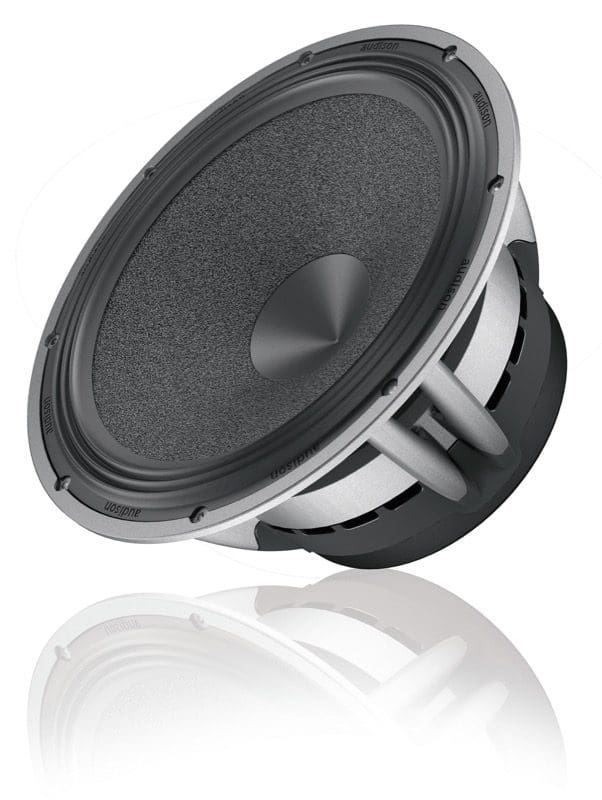
When an engineer designs a speaker, the first thing to decide is the application. Will this be a high-SPL car audio speaker, or a pro-sound speaker? The differences make a great deal of difference.

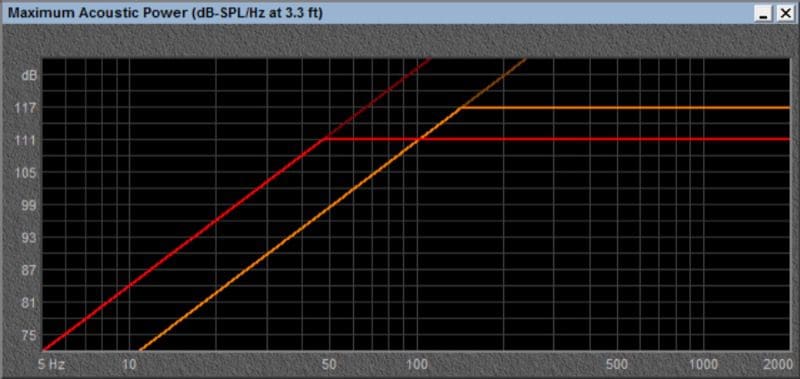
Our sample subwoofers also have dramatically different excursion capabilities. Sample A has an Xmax of 17.6 mm and Sample B has an Xmax of only 4 mm. It is worth noting and reminding everyone that cone excursion quadruples for every halving of frequency. If these speakers were given enough power to play 100 dB at 80 Hz with an excursion of 1 mm, then they would need to move 4 mm at 40 Hz. At 20 Hz, they would need to move 16 mm. An excursion requirement of 16 mm is no problem for Sample A, but will likely rip Sample B to shreds.

Comparing the output of two drivers requires that we ensure the driver can handle the excursion requirements necessary to meet our needs.

Subwoofer SpecificationsIn the case of our subwoofer simulations, due to excursion limits, Sample B can produce a maximum output of only 94.9 dB at 40 Hz. Sample A can produce 108.3 dB at the same frequency. That is a difference of 13.4 dB. This difference is significant. Sample B simply cannot produce 100 dB of output at 40 Hz in this enclosure. Thus, Sample B not a suitable choice for a subwoofer, which makes sense, since it was designed to be a bass guitar speaker.

Choosing the Right Subwoofer

Subwoofer SpecificationsUnless you own speaker-modeling software and know how to use it, it can be tricky to determine the performance of one subwoofer versus another. Even more difficult is attempting to predict how one sounds when compared to another. Frequency response is just one of the many criteria that differentiate one subwoofer from another. Excursion capabilities, enclosure requirements, distortion characteristics and – of course – cost are all factors to be considered.

Many people think that just because it is harder to hear distortion at low frequencies, the design of a subwoofer matters less than that of a midrange speaker. You would be stunned at how a good subwoofer can bring out details in your music that you may have never heard before.

When it is time to go subwoofer shopping, visit your local mobile electronics specialist retailer. Discuss your needs with them and work with them to find a subwoofer solution that fits your application. You will be happy that you did.

This article is written and produced by the team at www.BestCarAudio.com. Reproduction or use of any kind is prohibited without the express written permission of 1sixty8 media.

Filed Under: ARTICLES, Car Audio, RESOURCE LIBRARY

Product Spotlight: Audison AP8.9 bit

04/11/2017 By John Schwartz

Audison AP8.9 bitAudison is one of the industry leaders in mobile electronic product innovation and performance. One of their unique products is the Audison AP8.9 bit amplifier. This amplifier features eight channels of power as well as a powerful integrated digital signal processor (DSP). The onboard processing makes vehicle integration and system tuning easy. Let’s delve deeper into the features of this compact and powerful amplifier.

Platform and Connections

Audison AP8.9 bitA key feature of the AP8.9 bit is its overall size. The amp is only 7.8 inches long, 5.27 inches wide and 1.8 inches thick. The chassis is small enough to fit in the dash of many vehicles or beside a factory amplifier in the trunk or hatch. All of the connections to the amplifier are made along one side of the amp thanks to compact quick-connects for signal input and output. There are only two controls on the amplifier chassis. A switch puts the amp into upgrade mode for software updates, and an eight-position rotary control allows for selecting preset system configurations. The advanced manual offers details on these preset configurations.

The provided input harness accepts speaker-level connections from factory or aftermarket head units. Audison has optional two- and six-channel RCA harnesses for connecting to aftermarket head units. An optional speaker load module, called the ASP, is available for all vehicles that need to “see” a load impedance at the factory amplifier during the start-up sequence. The unit will accept input signals from 2 to 15 volts RMS and has automatic turn-on detection circuitry. Audison includes a TOSLINK optical input for signals from digital sources such as the Audison bit DMI MOST integration module.

The AP8.9 bit features eight amplified output channels, each rated to produce up to 35 watts of power into 4 ohms or 65 watts into 2 ohms. When bridged, each pair of channels can provide up to 130 watts into a 4 ohm load. A ninth channel is available on an RCA output to send to a dedicated subwoofer amplifier like the AP 1D.

Signal Processing Features

Audison AP8.9 bitA Configuration Wizard within the provided Windows-based software helps make the setup of the amp quick and easy. Audison includes nine input signal configurations, including three-way front stages, center channels, rear speakers and stereo subwoofer inputs.

To configure the signal path through the amp, Audison provides similar preset selections, including provisions for the use of passively filtered channels. You can let the unit set up basic crossover points for you, or go in and fine-tune them yourself. Crossover options include high-, low- and band-pass filters with the option of Butterworth or Linkwitz-Riley filter models. You can select crossover points and filter slope as well. Signal delay can be set by measured distances or in milliseconds. Each output channel also has a 10-band parametric equalizer. Finally, you have output level adjustments for each channel that are adjustable in 0.5 dB steps.

The ability to power speakers actively negates the signal loss that occurs with passive crossovers. The result is a system that plays as loudly as amplifiers that produce 50 or 60 watts of power.

Audison AP8.9 bit Tuning Power

Audison AP8.9 bitThe AP8.9 bit is compatible with the Audison bit Tune processor. Many Audison dealers have invested in this acoustic analyzer processor to accelerate the system tuning process. The bit Tune takes a left- and a right-channel measurement of both frequency and phase at different locations around the microphone position. It can then process the information and provide a configuration directly into the AP8.9 bit. Equalization, signal delay, and output level control are all set automatically.

Options

Audison AP8.9 bitTo provide control over preset selection, master volume (if desired) and subwoofer level control, the Audison DRC (Digital Remote Control) is compatible with the AP8.9 bit. The DRC can manually power the AP 8.9bit on or off, select different signal inputs options, preset tunes and control the system balance/fader. Audison also offers an amplifier-stacking kit called the APTK 3, to allow your installer to mount the AP8.9 bit on top of an AP 1D, or any of the Prima series amplifiers, up to a maximum of three amplifiers.

Applications for the AP8.9 bit are seemingly endless. Vehicles with difficult or impossible-to-replace head units or needing a replacement for a damaged factory amplifier are common applications. The system integration features of the AP8.9 bit, combined with flexible tuning functions, allow your installer to build an amazingly accurate and life-like audio system.

When it is time to upgrade your audio system, visit your local authorized Audison dealer to experience the AP8.9 bit for yourself.

This article is written and produced by the team at www.BestCarAudio.com. Reproduction or use of any kind is prohibited without the express written permission of 1sixty8 media.

Filed Under: Car Audio, PRODUCTS, RESOURCE LIBRARY Tagged With: Audison

  • « Previous Page
  • 1
  • …
  • 47
  • 48
  • 49
  • 50
  • 51
  • …
  • 82
  • Next Page »

801 EAST 82ND AVE
ANCHORAGE ALASKA 99518
907-563-8112

Copyright © 2026 | Site design by award-winning creative agency D'zine Alaska , with site support by 1sixty8 Media and Modern Media Geeks.